Quick reviews of two very useful Android productivity apps - Volume Widget and CB - Commercial Break

Because games are developed for Smartphones at a clip of  73 gazillion to one over productivity apps, I often jump at the chance to download and check out any new Android (or iPhone) application that may make my life easier or help resolve some issue. Here are a couple of simple apps which deliver big on their claims. Sure, they're simple claims, but they do deliver.

Volume Widget

The Volume Widget allows you to adjust any of your volume options from one convenient location. Your music, your ringtone, your alarm, your voice, etc.

So, why is that useful when you can adjust each of those when in that particular mode (adjust the call volume while in a call, ring volume when the phone rings, your music while it's playing)? Well, I'll tell you why with a real-life scenario:

Let's say that when you go to bed at night you like to make one last play in Words With Friends before going to sleep. And let's also say that your wife is lying right next to you, already asleep. Having forgotten to turn off the volume option in the game, as soon as you open the main screen you are attacked by loud, and apparently annoying music and sound effects, which blasts out causing your wife to say, "Excuse me darling, but I believe you neglected to reduce your volume prior to playing the game." Okay, those weren't her exact words. Her actual comment included phrases like "you inconsiderate piece of..." You get the idea.

So now, I have acquired the habit of immediately opening the Volume Widget and reducing the Music volume before even opening other apps.

Very useful and considerate app.

CB - Commercial Break

If you spend any time at all watching television (sports fans especially), the Android CB (Commercial Break) app will help you get get a few errands done, while the network is running what seems like an endless number of commercial messages. This Android app is the epitome of simplicity and really does help you take out the garbage, make a sandwich, even run to the store while trying to catch the big game.

Simply download the app, open it, enter your city or zip code, select a channel and you will be notified each time a commercial break is over, alerting you to get your butt back in front of the big screen.

You can also schedule future notifications for upcoming network sports broadcasts, which also reminds you that the game is on.

I'm sure that they are expanding the number of networks included in the app, still many complain that it doesn't include their country or cable system. Oh shut up. Download the app, check it out. If it doesn't fit into your life: UNINSTALL. If it does fit into your life, it is pretty useful and has motivated me, more than once, to get off my butt during breaks and do something.


Gymprovise workout app for Android keeps you on track - workout app review

Gymprovise Android Workout Program App Review

I go to the gym and workout at home. Primarily I work out at home when I'm too lazy to put on the proper attire to go to the gym. At home I have a treadmill, stationary bike, elliptical trainer and free weights. My routine is always pretty much the same at home. Thirty minutes of cardio and then pick up the hand weights and do stuff with them. Hey, shut up. It's better than most people do.

When I go to the gym, I improvise as well. I never really have a plan. It always starts with cardio on the stationary bike or elliptical trainer, then I pick machines that I'm in the mood for, and use them. I figure if I mix it up a bit, I'll cover all of the muscle groups. Smart? I don't know, but it's worked for me so far. Okay, except maybe in that belly area, but how many damned sit-ups do I  have to do?

Being a lover of apps, and having used MyFitnessPal to drop twenty pounds this go-around, I decided to add an Android app to my gym workout regimen to help make it an actual well-rounded program. Sort of like having a personal trainer in my pocket, without taking so much money out of it.

After a bit of research, I opted to download the paid version Gymprovise. It immediately looked like an excellent interface and since I didn't want to be at the gym using the free version only to discover that I don't have a feature I wanted to use, I bought the Pro Version. I mean, come on, its only three bucks.

Here's what I learned right after loading it: It was brutally easy to use and formatting my workouts (both home and gym) went smoothly. 

Without going into all of the exciting details of my specific workouts, let me tell you that Gymprovise fit very well into my life.

One of my favorite features at the gym is that it allows me to vary my workout (I'm easily bored) by choosing a
different exercise, while still focusing on the area or body part I was working on at that time. Also, if you're adding a new exercise that you haven't done before, you can view a video animation of the proper way to perform it.

I easily found all of the exercises that I already do (machines, free weights and home) and expanded my workout and reduced my boredom with this app.  Plus, just like the MyFitnessPal app, it sort of haunts you because you're aware that your phone is beckoning you from your pocket to push the button for the next workout.

I know there are many more features that I will learn and love, but so far it was a great investment. For three bucks you get a workout tracker, planner, exercise directory, weight tracker and more.

If you're looking for a workout companion that is user-friendly and a real motivator to help get you fit, then Gymprovise may just be what you're looking for.


Spell check and autocorrect won't help you with this great spelling game app - WellWrite Android app review

It ocurred to me (oh wait, that's "occurred" isn't it) that, as a word game lover, I didn't know of any Android/Smartphone spelling game apps. Well, I found one. WellWrite. And I love it.

I have always prided myself on being a good speller. In fact I made the semi-finals in the eighth grade spelling bee. I was eliminated on a word that I will never again misspell. Using the WriteWell app format, here's the word that I spelled incorrectly in the eighth grade.

Pick the correct spelling:

1) cantelope
2) cantalope
3) cantaloupe
4) cantleope

So, whattaya think? Well, the answer is number three. I think I spelled number one. That wouldn't have happened if I had had the WellWrite app for Android. Too bad it was a few decades before the game was created.

WellWrite is a free app (with additional levels for a nominal fee) which displays four possible answers (including the occasional "none"), and you have to click on the correct spelling. Simple and addictive.

The interface has a classy, private-school look and is simple to use. You can choose between a number of options including One and Two Player games. Each round consists of 20 words (I got 18 correct in my first try). When you finish each found you WILL be graded (A+ to F) but it will not go on your permanent record. J

Of course, you can share your brilliance with others (and compete with them) on Facebook, Twitter and Google+.

It also features a pretty soothing music track while playing the game.

This fun app is perfect for anyone who either thinks they're a good speller or wants to become one (because they rely WAY too much on spellcheck and autocorrect).


WellWrite is a great spelling game app and is highly reccommended, or is it recomended, or is it...? Oh, never mind.


YTD Video Downloader app review - download videos to view any time

The YTD app for Android allows you to browse and download free video and audio files from a growing number of streaming sites. The interface is pretty easy to use and allows you to browse right within the app, or copy and paste the url from whatever browser you're using to download the video.

Then you simply click on the play button for the video, (within the YTD app's browser) and you are presented with the option to Download or Play. Click Download and the video is downloaded to your SD card. You can now view it at any time without a data connection. 

Under the settings tab, you can set it to only download when you're on WiFi and you can lock the application so no one can see your downloaded videos (wink wink). The Play List tab allows you to sort your downloads by date, size or title.

Pretty simple and pretty cool.

Because the app is called YTD, many assume that it stands for YouTube Downloader. Unfortunately, YouTube does not allow for easy downloading of their videos either online or mobile and YTD clearly states on their website that the app does NOT download YouTube videos.

But that doesn't stop nasty people from giving bad reviews of the app for that reason. How can you give an app a bad review for not doing something that they didn't claim to do in the first place? Silly people. Download it and judge for yourself.

Here is a link to a list of the sites from which you can download videos. Okay, aside from a few (Funny Or Die, Metacafe) they are mostly adult video sites, but hey, it's not like nobody does that.

The app works EXACTLY as promoted and quite well at that. It's simple, straight forward and useful, if you have a reason to compile of collection of videos that you want to be able to watch at any time (wink, wink again).

Note: The YTD Video Downloader app is also available on the iOS platform. Download it here.


Contactive Universal Caller ID app review - merge your mobile life with this great Android app

When I downloaded the Contactive app for Android from Google Play, I decided to make it my go-to app for making calls, accessing my contact lists and day-to-day texting. Then I'd see what else the app does for me. I also connected it to my Facebook account, since that account does provide me with a lot of other contact information that may not be in my regular address book.

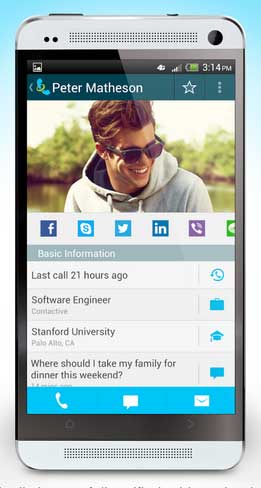
First off, the transition was seamless. The Contacts list looked much like what I was accustomed to, including a Quick Call button which showed my recent contacts, including when and how I contacted them last. So making and receiving calls and texts felt completely normal. And a bit more convenient as soon as I began remembering to open it instead of the multiple apps I was used to opening.

But then I discovered that the app offers much more in the way of marrying your social networking channels and creating more functionality in one place. If people are going to keep adding more and more things do do with their Smartphones, it will become increasingly important for some of those apps to combine the features of a bunch of other apps. Contactive does that.

One of the apps claims, which sets it apart from your normal address book, is that you can often be informed as to who was calling even when the caller isn't in your address book. This is accomplished by utilizing Facebook, LinkedIn, Twitter, Yelp, Google Places, the White Pages, Gmail and their own Global Directory. It didn't take long for me to verify the effectiveness of this feature when the listing from a call from someone I had never corresponded with popped-up. I saw their name, address and a map showing me the origination of the call. Kinda creepy, but pretty cool.

The Update feature (when connected to Facebook) provides you with a list of upcoming birthdays (and probably other stuff). I found this feature useful because if I don't have anything to say or I'm busy, I often don't log into Facebook for a few days at a time. And we all know how devastating it is when you miss someone's birthday who you've never even actually met. :)  Seriously, it's an easy and convenient screen to see upcoming birthdays so you can decide whether you want to send them a greeting or not.

The Lists feature also connects the Contactive app with the Lists you belong to on Facebook as well as shows you which of your Friends also belong to that group.

Because I love productivity apps, let's take a quick look at one scenario using Contactive. Let's say you get a call from someone you've been trying to do business with. You don't know them well and don't really recognize who they are when they call. With Contactive, their listing in your address book will show you how you are connected with them (Facebook, Twitter, LinkedIn) and you can quickly click on that link to get a little back story. Even while in the call. This feature alone makes it worth a download for me.

The Contactive app has gotten great reviews from some very respected sources (including CNET and TechCrunch) and the developers are working to add new features. I will continue using this app just so I can see what other cool stuff they come up with.

Let's recap: 

1) Contactive will identify unknown callers before you pick up the call.
2) It will unify (and simplify) contact info from all of your social media networks.
3) You can connect with Friends on Facebook directly from the Contactive app (and other social networks).

Contactive was developed in New York City by a group of designers, marketers and engineers as a method to simplify, while expanding, your address book and the mobile experience. They've done a really nice job. Visit their website for more information.

Let me know your thoughts.

The Million Second Quiz app is a fun game and brilliant marketing

If you like trivia this is a great app regardless of the connection to the NBC game show which premieres on Monday, September 9th. Download the app from Google Play and just have fun.

However, if you reach a reasonable plateau (about 20 games assuming you win your share of them), you can also apply to be a Line Jumper and actually appear on the NBC show in New York City.

The game is wonderfully simple: you play against a live opponent located somewhere in the country (the app shows you where your opponent resides) and you each are presented with ten questions with varying point values. You have five seconds to answer each of the questions and once completed, the winner is awarded the seat in the money chair and receives bonus points.

Once the app was finally available for Android I downloaded it and began playing. The only flaw in the Million Dollar Quiz game is that it wouldn't allow me to log in through my Facebook account and when I play I have to Play Anyone (the computer finds an opponent) because the Play with Friends option is not active.

As I said the game is fun and once you have applied to be on the show you do have an outside chance of being contact to appear on the television show and win $10 every second, $36,000 an hour, $864,000 a day.

Now that I think of it, since I've already qualified, why don't you not download the Million Dollar Quiz. That way I have a better chance of being called.

Never mind.

The best text messaging app: perhaps What's App

I never understood why anyone would ever talk about what the best text messaging app is. A text messaging app is a text messaging app is a text messaging app. You choose your recipient, speak or type your message, and hit send. Done.

And like most people, I felt that the text messaging app that came with my phone was good enough to get the job done. And it does.

Then my daughter sent me a request to download WhatsApp. WhatsApp is a text messaging app for Android, iPhone, Blackberry, Windows Phone and the other ones which no one actually owns. 

WhatsApp has all of the standard features of every text messaging app but is also loaded with extras. There are hundreds of little icons to embellish your message. So sometimes you don't even need words. Just send an image of the woman getting her nails done or getting a haircut and you're done. Silly? Sure, but really a lot of fun and can make for some creative messaging.

In addition to texting and sending little images, you can also attach images or pics, take photos, add video or audio, even share your location. The latest update also includes voice messaging. Just hold down the little microphone, speak, let go and it automatically sends your voice message. 

The first time I tried it I thought that it was just going to convert my words to text so I spoke really slowly and included verbal punctuation. Then it sent the actual audio. Oops. I sounded like Karl from the movie "Slingblade." "I like the way you talk. Mmmmm hmmmmm."

So, I was going to give this app 4,994 stars out of 5,000 (hey, I can rate 'em however I want), but when visiting the WhatsApp page on Google Play I discovered that it is only free for the first year. Then they want 99 cents per year.

WhatsApp wit dat?