Showing posts with label android app reviews. Show all posts

Pocket Android app review - keep track of all the stuff you want to do later - online and offline

If you're like almost everyone else with a Smartphone, you find yourself constantly searching the web for answers to probing questions (like how long do I grill a T-bone steak), articles you intend to read, but don't have time right now, videos your sister-in-law recommended and lots of other websites, Tweets and Facebook posts that you have on your to-do list. When you have time.

Seriously, how often are you looking for something and run across something else which is totally unrelated but interesting? For me, that happens a lot. Of course you can bookmark the page, copy and paste the URL and email it to yourself or use a notepad app to save it. But the Pocket app seems to be the easiest interface to save it and then retrieve it at your convenience.

Simply download the free app and the Pocket icon and link is added to your Share drop-down menu. Then, when you run across a web page you want to save for later, or just to read it when you want, it will be very easy to save it and locate it on your mobile device, tablet or home computer. Simple as that.

Better yet, if you're a traveler and find yourself without internet access, you can even read or view the stuff you saved offline (something you can't do with Bookmarks or notebook apps).

Another cool feature when you download an article is that Pocket automatically gets rid of a lot of the extra stuff (ads and unnecessary coding) and makes the reading much nicer.

This app review is for the Android version of Pocket, but it is also available on iOS.

You can download the Android app here.

Stupid afterthoughts: If you download a billiards game page for later viewing, you could call it "Pocket Pool." If you save a website on combustible projectiles you could refer to it as your "Pocket Rocket." (Sorry.)

Frequency personal video organizer app available for Android - One stop shopping for all your free video viewing! App Review

If you are like most of the Smartphone community, you use your device to watch videos. And if you love watching on your phone or tablet, it can be pretty annoying visiting so many different sites or loading a ton of apps to see all of the videos that interest you. Enter Frequency, a very cool, free app that is now available on Android after the iOS version received the Editor's Choice in the iTunes app store, and was chosen as one of the Top 100 Websites of 2013 by PC Magazine. 

The Frequency app is a very slick, easy to navigate app that gives you quick access to all of the free videos and video channels that you watch, and with more than 4,000 video channels in their database (and growing) you will always find entertaining ways to kill time, educate yourself or explore new channels. You can search for videos by topic or use their guide. You can even create your own channels and add your favorite stuff from such popular sources as YouTube, CNN, Funny Or Die and more. And if you just want to view some cool videos without searching or thinking, the Staff Picks channel is always a good choice. If you log in with your Facebook or Twitter account on Frequency, you will have a channel that features all of the videos that your friends and followers are posting, without having to scroll through all of the stuff they posted that you really don't care about.

Just download it and click around. Trust me. You'll discover the Featured section where you can view current top news stories, most shared videos, top comedy picks, up to the minute movie and TV trailers and the list goes on and on. Fox News, The Late Show with David Letterman, Reddit, CNN....see I told you. If you click on the Frequency Guide you can watch trending videos, animations, business, celebrities, fashion and on and on.

Basically, Frequency is a really cool browser app that focuses exclusively on videos. Be careful, you may sit there for hours once you get started. Just for kicks I clicked on "Celebrity" in the Guide. I was presented with video links to TMZ, The Hollywood Reporter, E!, Entertainment Weekly, Rolling Stone and a number of equally entertaining, but a bit less mainstream options like Stupid Famous People and Celeb Dirty Laundry. There are so many options on Frequency that each heading in their Guide gives you the option to view Popular, New or even alphabetical listings.

If you do the same with the News link, here you go again: CNN, BBC, New York Times, CBS. Time Magazine, Wall Street Journal.

And that list is just from two of the more than 40 options in their Frequency Guide.
So, if you're looking for a smooth, slick interface for watching video on your Android (or iPhone or tablet), you must download this app. You can thank me later.

Arrow Flick Android Game is right on target - app review

In a never ending onslaught of Android and iPhone games, Arrow Flick hits a bulls eye.

I download a lot of games, even if only to review them, and I will tell you that it's been a while since I downloaded one which will stay on my phone and be part of my routine for playing certain games that I really like when the mood hits me. Sometimes I want to kill Zombies, other times I want to bowl or play ski ball. Well, now I'm also going to want to shoot my bow and arrow at targets and occasionally get lucky enough to hit one of the animals who mosey onto the screen.

I'm not a big fan of hunting and shooting defenseless animals, but then again, I don't have anything against Zombies, and I love blowing them away with a variety of cool weapons.

Arrow Flick starts out easy. Well, it's called easy but it took me a number of shots before I actually hit a target. As you're practicing shooting at targets on the backs of animated stuffed dummies, an occasional  real live animated animal walks into the scene. I usually miss them, but I have hit a couple.

Once I got the hang of aiming, drawing back the bow and releasing it in the general direction of the target, I made it through the Easy level in what I imagine is a reasonable amount of time. It did take me a little longer than it would have, but sometimes I missed on purpose just to see the funny, rude insults which would be thrown at me because of my incompetence.

But now that I'm getting better I will look deeper into some of the features the game offers, like choosing different arrows and quivers.

There are six free rounds in  three game modes. You get points by accomplishing 183 different achievements which includes hitting all three targets, head shots, kill shots and a variety of other things I may never accomplish. Each of the three game modes (Easy, Normal and High Wind Challenge), has 50 rounds.

If you like a fun distraction that you can come back to time and again, I highly recommend Arrow Flick. Great graphics, sound and play. Plus I also learned what the hell a quiver was.

Available on Android and iOS.


Quick reviews of two very useful Android productivity apps - Volume Widget and CB - Commercial Break

Because games are developed for Smartphones at a clip of  73 gazillion to one over productivity apps, I often jump at the chance to download and check out any new Android (or iPhone) application that may make my life easier or help resolve some issue. Here are a couple of simple apps which deliver big on their claims. Sure, they're simple claims, but they do deliver.

Volume Widget

The Volume Widget allows you to adjust any of your volume options from one convenient location. Your music, your ringtone, your alarm, your voice, etc.

So, why is that useful when you can adjust each of those when in that particular mode (adjust the call volume while in a call, ring volume when the phone rings, your music while it's playing)? Well, I'll tell you why with a real-life scenario:

Let's say that when you go to bed at night you like to make one last play in Words With Friends before going to sleep. And let's also say that your wife is lying right next to you, already asleep. Having forgotten to turn off the volume option in the game, as soon as you open the main screen you are attacked by loud, and apparently annoying music and sound effects, which blasts out causing your wife to say, "Excuse me darling, but I believe you neglected to reduce your volume prior to playing the game." Okay, those weren't her exact words. Her actual comment included phrases like "you inconsiderate piece of..." You get the idea.

So now, I have acquired the habit of immediately opening the Volume Widget and reducing the Music volume before even opening other apps.

Very useful and considerate app.

CB - Commercial Break

If you spend any time at all watching television (sports fans especially), the Android CB (Commercial Break) app will help you get get a few errands done, while the network is running what seems like an endless number of commercial messages. This Android app is the epitome of simplicity and really does help you take out the garbage, make a sandwich, even run to the store while trying to catch the big game.

Simply download the app, open it, enter your city or zip code, select a channel and you will be notified each time a commercial break is over, alerting you to get your butt back in front of the big screen.

You can also schedule future notifications for upcoming network sports broadcasts, which also reminds you that the game is on.

I'm sure that they are expanding the number of networks included in the app, still many complain that it doesn't include their country or cable system. Oh shut up. Download the app, check it out. If it doesn't fit into your life: UNINSTALL. If it does fit into your life, it is pretty useful and has motivated me, more than once, to get off my butt during breaks and do something.


Spell check and autocorrect won't help you with this great spelling game app - WellWrite Android app review

It ocurred to me (oh wait, that's "occurred" isn't it) that, as a word game lover, I didn't know of any Android/Smartphone spelling game apps. Well, I found one. WellWrite. And I love it.

I have always prided myself on being a good speller. In fact I made the semi-finals in the eighth grade spelling bee. I was eliminated on a word that I will never again misspell. Using the WriteWell app format, here's the word that I spelled incorrectly in the eighth grade.

Pick the correct spelling:

1) cantelope
2) cantalope
3) cantaloupe
4) cantleope

So, whattaya think? Well, the answer is number three. I think I spelled number one. That wouldn't have happened if I had had the WellWrite app for Android. Too bad it was a few decades before the game was created.

WellWrite is a free app (with additional levels for a nominal fee) which displays four possible answers (including the occasional "none"), and you have to click on the correct spelling. Simple and addictive.

The interface has a classy, private-school look and is simple to use. You can choose between a number of options including One and Two Player games. Each round consists of 20 words (I got 18 correct in my first try). When you finish each found you WILL be graded (A+ to F) but it will not go on your permanent record. J

Of course, you can share your brilliance with others (and compete with them) on Facebook, Twitter and Google+.

It also features a pretty soothing music track while playing the game.

This fun app is perfect for anyone who either thinks they're a good speller or wants to become one (because they rely WAY too much on spellcheck and autocorrect).


WellWrite is a great spelling game app and is highly reccommended, or is it recomended, or is it...? Oh, never mind.


YTD Video Downloader app review - download videos to view any time

The YTD app for Android allows you to browse and download free video and audio files from a growing number of streaming sites. The interface is pretty easy to use and allows you to browse right within the app, or copy and paste the url from whatever browser you're using to download the video.

Then you simply click on the play button for the video, (within the YTD app's browser) and you are presented with the option to Download or Play. Click Download and the video is downloaded to your SD card. You can now view it at any time without a data connection. 

Under the settings tab, you can set it to only download when you're on WiFi and you can lock the application so no one can see your downloaded videos (wink wink). The Play List tab allows you to sort your downloads by date, size or title.

Pretty simple and pretty cool.

Because the app is called YTD, many assume that it stands for YouTube Downloader. Unfortunately, YouTube does not allow for easy downloading of their videos either online or mobile and YTD clearly states on their website that the app does NOT download YouTube videos.

But that doesn't stop nasty people from giving bad reviews of the app for that reason. How can you give an app a bad review for not doing something that they didn't claim to do in the first place? Silly people. Download it and judge for yourself.

Here is a link to a list of the sites from which you can download videos. Okay, aside from a few (Funny Or Die, Metacafe) they are mostly adult video sites, but hey, it's not like nobody does that.

The app works EXACTLY as promoted and quite well at that. It's simple, straight forward and useful, if you have a reason to compile of collection of videos that you want to be able to watch at any time (wink, wink again).

Note: The YTD Video Downloader app is also available on the iOS platform. Download it here.


Contactive Universal Caller ID app review - merge your mobile life with this great Android app

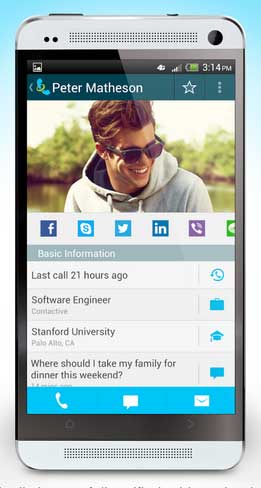
When I downloaded the Contactive app for Android from Google Play, I decided to make it my go-to app for making calls, accessing my contact lists and day-to-day texting. Then I'd see what else the app does for me. I also connected it to my Facebook account, since that account does provide me with a lot of other contact information that may not be in my regular address book.

First off, the transition was seamless. The Contacts list looked much like what I was accustomed to, including a Quick Call button which showed my recent contacts, including when and how I contacted them last. So making and receiving calls and texts felt completely normal. And a bit more convenient as soon as I began remembering to open it instead of the multiple apps I was used to opening.

But then I discovered that the app offers much more in the way of marrying your social networking channels and creating more functionality in one place. If people are going to keep adding more and more things do do with their Smartphones, it will become increasingly important for some of those apps to combine the features of a bunch of other apps. Contactive does that.

One of the apps claims, which sets it apart from your normal address book, is that you can often be informed as to who was calling even when the caller isn't in your address book. This is accomplished by utilizing Facebook, LinkedIn, Twitter, Yelp, Google Places, the White Pages, Gmail and their own Global Directory. It didn't take long for me to verify the effectiveness of this feature when the listing from a call from someone I had never corresponded with popped-up. I saw their name, address and a map showing me the origination of the call. Kinda creepy, but pretty cool.

The Update feature (when connected to Facebook) provides you with a list of upcoming birthdays (and probably other stuff). I found this feature useful because if I don't have anything to say or I'm busy, I often don't log into Facebook for a few days at a time. And we all know how devastating it is when you miss someone's birthday who you've never even actually met. :)  Seriously, it's an easy and convenient screen to see upcoming birthdays so you can decide whether you want to send them a greeting or not.

The Lists feature also connects the Contactive app with the Lists you belong to on Facebook as well as shows you which of your Friends also belong to that group.

Because I love productivity apps, let's take a quick look at one scenario using Contactive. Let's say you get a call from someone you've been trying to do business with. You don't know them well and don't really recognize who they are when they call. With Contactive, their listing in your address book will show you how you are connected with them (Facebook, Twitter, LinkedIn) and you can quickly click on that link to get a little back story. Even while in the call. This feature alone makes it worth a download for me.

The Contactive app has gotten great reviews from some very respected sources (including CNET and TechCrunch) and the developers are working to add new features. I will continue using this app just so I can see what other cool stuff they come up with.

Let's recap: 

1) Contactive will identify unknown callers before you pick up the call.
2) It will unify (and simplify) contact info from all of your social media networks.
3) You can connect with Friends on Facebook directly from the Contactive app (and other social networks).

Contactive was developed in New York City by a group of designers, marketers and engineers as a method to simplify, while expanding, your address book and the mobile experience. They've done a really nice job. Visit their website for more information.

Let me know your thoughts.

The best text messaging app: perhaps What's App

I never understood why anyone would ever talk about what the best text messaging app is. A text messaging app is a text messaging app is a text messaging app. You choose your recipient, speak or type your message, and hit send. Done.

And like most people, I felt that the text messaging app that came with my phone was good enough to get the job done. And it does.

Then my daughter sent me a request to download WhatsApp. WhatsApp is a text messaging app for Android, iPhone, Blackberry, Windows Phone and the other ones which no one actually owns. 

WhatsApp has all of the standard features of every text messaging app but is also loaded with extras. There are hundreds of little icons to embellish your message. So sometimes you don't even need words. Just send an image of the woman getting her nails done or getting a haircut and you're done. Silly? Sure, but really a lot of fun and can make for some creative messaging.

In addition to texting and sending little images, you can also attach images or pics, take photos, add video or audio, even share your location. The latest update also includes voice messaging. Just hold down the little microphone, speak, let go and it automatically sends your voice message. 

The first time I tried it I thought that it was just going to convert my words to text so I spoke really slowly and included verbal punctuation. Then it sent the actual audio. Oops. I sounded like Karl from the movie "Slingblade." "I like the way you talk. Mmmmm hmmmmm."

So, I was going to give this app 4,994 stars out of 5,000 (hey, I can rate 'em however I want), but when visiting the WhatsApp page on Google Play I discovered that it is only free for the first year. Then they want 99 cents per year.

WhatsApp wit dat?


Is Google Keep really better than OneNote, EverNote and other Note Pad apps? Methinks no!

When I first heard about the Google Keep note pad app, and how it synced with all of my other Google stuff, I thought that it should easily fit into my life and replace my reliance on ColorNote, which I've found to be pretty damned sufficient for my needs.

Primarily, I need a note pad app to, well, take notes. Jot down ideas, grocery lists, jokes, whatever. And ColorNote works great in that regard, but hey Google is firmly attached to my life, and to be able to easily access it on all of my devices and my laptop sounded like a great idea.

However, the "easily" part isn't working out.

The Google peeps need to spend a bit more time thinking about their interface and how it interacts with users.  Or at least make it easy to find answers to simple questions.

I downloaded the app and creating new notes or lists was quite simple. Okay, I have a couple of notes that I want to access on my laptop. Being a Google app, it stands to reason that I only need to log into my Google account, Gmail, etc. and there should be some sort of button to push to access my new Google Keep account. Let's look.

Okay, right there in the Google menu bar is Google+, Search, Images, Maps, Play, YouTube, News, Gmail, Drive, Calendar and More. Nope, none of those indicate Google Keep is lurking below them. So, I'll click on More. And there I find: Translate, Mobile, Books, Offers, Wallet, Shopping, Blogger, Finance, Photos, Videos and Even more.

Damn it! If you claim that it's "easily" accessed on your laptop or P.C., I'm thinking that it should be easy and obvious where the notes are located in the account with which the app is associated. None of the More's say anything about Google Keep. So let's try the "Even mores."

Wow! Another page jam packed with a crap load of links to Web, Mobile, Media, Geo, Home and Office, Social, Specialized Search and Innovation. But, again, not one gives a strong indication that they are in any way connected to Google Keep.

So, now I have spent, nay, wasted quite a bit of time trying to do what I was originally told was "simple."

Oh, I'm sure some of you will email me and them me that I'm the "simple"ton because it was easy for them to discover where there stuff was, but hey I'm just telling you how it was for me.

So now I'm thinking that I must have missed something in the app that told me exactly where to go to view it online. Here's a screen capture from my RAZR of the opened app (wanna know how to do a screen capture on an Android device? Click here.). Do you see anything? Me either.

After clicking on the menu in the app and then on Help I was taken to the web, where I also got no help. I found a page which informed me that Google Keep is an app that lets me easily create notes on the go and since it syncs with Google I can access them virtually from anywhere. HOW?????

Although I'm going to dig deeper and figure this out, shame on Google for making it so difficult. With my ColorNotes app, I "simply" email my notes to myself and guess what? I can access those notes virtually anywhere by simply opening my Gmail account.

I'm thinking that maybe I won't even bother keeping Google Keep.

NOTE: I just read another review of the Google Keep app, and discovered that you can access it through your Google Drive account (even though there is NO DAMN LISTING FOR GOOGLE KEEP WHEN YOU GO TO YOUR DRIVE PAGE) by accessing https://drive.google.com/keep/. If you put the Google Keep notes in that location, don't you think that there should be a Keep button to push on the Drive page? Me too.


London 2012 Official Olympic Android game app review

This week, the Official (so they tell me) London 2012 Summer Olympic Android and iOS game app was released. The info they sent me tells me that the game allows you to participate in nine of the most anticipated events at this year's summer games.

It sounded interesting, but as many of you know, I'm more inclined to download, install and review productivity apps like CamScanner PDF maker or Vlingo than review an Android or iPhone game app. But, I figured I'd watch the YouTube video they sent and see how it looks. The YouTube video is only 37 seconds long, but that's all it took to hook me. Wow! That looks so cool. I gotta download this baby.

So, I followed this link to get the free version and sent it to my Android phone. I neglected to switch it to 4G and was wondering why it was taking so long to download. Because it's 49 freaking megabytes big, that's why. Midway through the download I switched to 4G on my Thunderbolt and figured I'd check it out during my lunch hour.

When I went to open it, I was greeted with an update (I only downloaded it an hour earlier), and the damned update took a very long time to download as well. But finally, I had the game and was ready to play.

The London 2012 Olympic game lets you participate in 110m Hurdles, Swimming, Kayaking and Archery and more. All events are displayed in 3D graphics at official London 2012 venues. You create your own athlete and the graphics are amazing.

The instructions for the first two events I tried (100 meter run and freestyle swimming) were very clear and I was ready to go.

I must say, it's a pretty fun app and if you have the time and space, I'd recommend it. I know I plan to play more.

Android game app review - Pluto Strikes Back - Asteroids for Android

KittyWireless.com
After I first started writing this blog, I was so excited that a couple of developers actually sent me their new apps to try and review. That meant that at least a couple of developers were reading this blog.

Then, thanks to you and your kind, readership grew. Then, more and more developers started sending me apps to review. Now, I can't keep up. I probably have a backlog of 30 or more requests to review and some of them are way back in my email folder and will probably never be seen again. To those developers, I apologize. One of you probably sent me the coolest app ever, and I missed it.

If you do have a new app that you want me to review, here are a couple of pointers as to how to get me to actually do it:

1) If it's already in the Android Market (GooglePlay), provide the link to the GooglePlay page along with your captivating copy to get me interested. That way, if it sounds like something I might like to see, I just click and send it to my phone.

2) If it's not in the market, provide me with the link to download it. If it costs money to purchase the app, send me a FREE COPY. Sorry, but I'm not going to pay to review your app. I work really hard for every buck ninety-nine I have.

3) Don't be offended if I don't review your app. It could be for any number of reasons. Maybe your app is a game and I'm kinda sick of playing games. I have my little game family and it ain't easy getting in. Or perhaps, I hated your app. Usually, I won't write a bad review. I feel that my duty here (hee, hee..he said duty) is to share things that I think are cool or useful or funny, not shit that sucks. Plenty of that all around you. Quick, look to your right. See! Told you.

Anyway, today I'm going to review three of the apps sent to me by developers. Now, let me say that when it comes to games it a very subjective thing. Some people like intricate role-playing games, others like to drive fast cars, and still others like to shoot alien pumpkins and blow up zombies (okay, that's me). Then there's the whole word game genre. So, that being said, this is just what I think.

Pluto Strikes Back

This is a game very similar in look to the classic Asteroids, but instead of using hand controls to move your spaceship around, you just tilt your device. To shoot, you tap the screen in the direction you wish the explosive to project.

Rules completed. Engage play.

After getting easily blown up on my first few attempts, I wanted to dismiss it as total garbage. Yet, something lured me back. I needed to get a little better at it. And, as is often a good quality in a game, it's quick. No big committment to time required. Unless, of course, you get REALLY good at it and go many cool levels deeper into the game.

Unfortunately, I won't be able to address that because, even though the game has grown on me a little bit, I still suck at it.

Their backstory is simple and, frankly, unneccesary. Pluto is no longer a planet, so they're attacking. And you, the player, will get money for shooting enemies. There is an upgrade but I have no clue what you get for the money. Also, don't care.

My biggest complaint is that you play and play and finally get to a level where different enemies are appearing and then, you get blown up once and the game ends. You are then taken to a screen to try again or exit. No indication as to how you did. No recording of your high scores. No likie that part.

On the other hand, it's a rather fun time killer. Download it in GooglePlay and see what you think.

Stupid Zombies is stupid fun - Android game app review

Stupid Zombies

If you like Angry Birds, I'm thinking you'll love Stupid Zombies. As far as Android games go the simplistic object of the game is to shoot stupid zombies. What makes them stupid? They just stand there waiting for you to figure out how shoot them, either directly or by ricocheting your bullets or blowing up something else that falls on them or something. There are explosive containers, boxes, beams, planks and other objects that you can use to kill the stupid zombies for those times when you can't get a direct shot at them. 

You don't move. They don't move. You just set your crosshairs where you want your bullet to go and blast away. You get five bullets for each level and bonus points for any bullets you have left after re-killing the undead.  

This game has four stages and sixty levels in each stage. And the whole damn thing is free.

And I don't know about you, but I'd rather shoot a zombie with a gun than try to kill little birdies with a slingshot.

For more Android app reviews, visit http://hookedondroid.com/